"Agent" is one of those words that sounds grander than it is. Strip away the marketing and an AI agent is a surprisingly small piece of code.
In this guide you'll build one: a study helper that can read your notes file and do sums for you. It takes about 20 minutes and roughly 100 lines of Python. The tools are deliberately harmless. Nothing here runs shell commands or deletes files.
What an agent actually is
An agent is three things:
- A model. Here, Claude.
- Tools. Ordinary Python functions that Claude can ask you to run.
- A loop. Your code keeps going until Claude says it's finished.
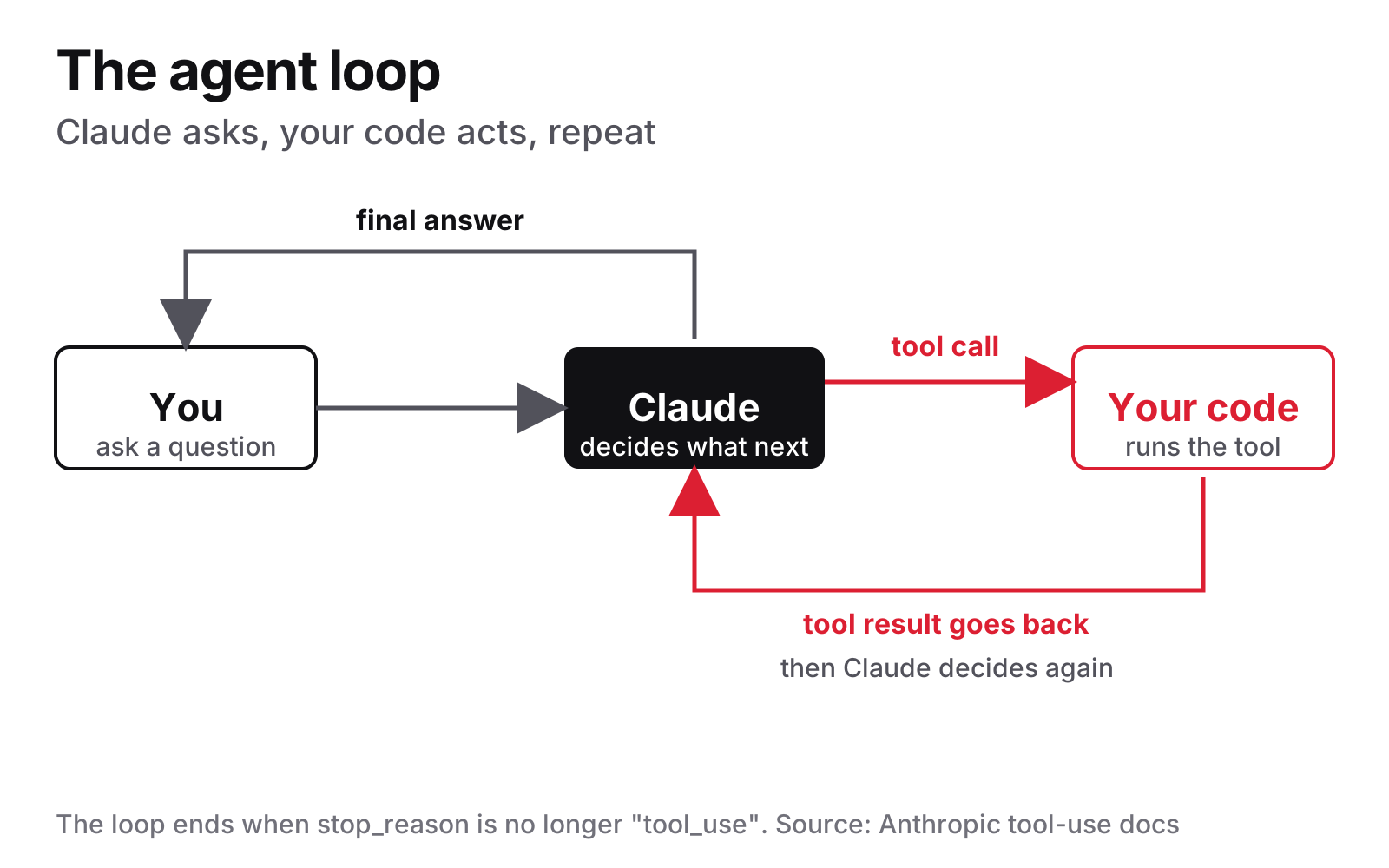
Claude can't run your code. It can only say "please call the calculator with these numbers". Your program does the work, hands back the result, and Claude carries on. That back-and-forth is the whole trick.
Before you start
You need:
- Python 3.10 or newer. Check with
python --version. (On macOS and Linux it may bepython3.) - An Anthropic account and API key. Make one in the Claude Console. The API is billed separately from a Claude chat subscription, and it uses pay-as-you-go credit, so you'll need to add a little.
- A little money. Prices are per million tokens, the units AI text is billed in. Anthropic's pricing page lists Claude Haiku 5.5 at $0.10 per million input tokens and $0.50 per million output tokens (for prompts up to 100,000 tokens). This agent sends a few thousand tokens per run, so a test costs a fraction of a cent.
Make a folder, then create a virtual environment so the install stays tidy and separate from everything else on your machine.
On Windows (PowerShell):
mkdir study-agent
cd study-agent
python -m venv venv
venv\Scripts\Activate.ps1
pip install anthropic
$env:ANTHROPIC_API_KEY = "paste-your-key-here"
On macOS or Linux:
mkdir study-agent && cd study-agent
python3 -m venv venv
source venv/bin/activate
pip install anthropic
export ANTHROPIC_API_KEY="paste-your-key-here"
The last line stores your key in an environment variable for that terminal window only. The SDK reads it automatically, so the key never appears in your code. That matters: never paste a key into a script you might share or upload.
Finally, create a file called notes.txt next to your script with two lines in it:
Biology exam: 120 pages left to revise.
Plan: 15 pages per day.
Step 1: send your first message
Create study_agent.py and start small.
import anthropic

MODEL = "claude-haiku-5-5"

client = anthropic.Anthropic()

response = client.messages.create(
    model=MODEL,
    max_tokens=1000,
    messages=[
        {"role": "user", "content": "Say hello in one line."}
    ],
)

for block in response.content:
    if block.type == "text":
        print(block.text)
What's happening: Anthropic() creates a client that finds your key in the environment. messages.create sends a conversation, which is a list of messages, each with a role and some content. Claude's reply comes back as a list of content blocks, so we loop through and print the text ones.
Run it with python study_agent.py. If you see a greeting, your setup works.
Why Haiku 5.5? It's the cheapest current Claude model, and the tool-use feature we need works on it. If you want more careful answers later, change MODEL to claude-sonnet-5-5, which costs $2 and $10 per million tokens. Anthropic's tool-use docs list both IDs as supporting tools. Swapping is a one-word change.
Step 2: describe a tool
Tools are described to Claude with a name, a plain-English description and a schema saying what inputs the tool takes. Claude uses the description to decide when to call it, so write it like you're briefing a colleague.
Add this above your request:
TOOLS = [
    {
        "name": "calculator",
        "description": (
            "Do basic arithmetic on two numbers. Use this "
            "for any sum, difference, product or division."
        ),
        "input_schema": {
            "type": "object",
            "properties": {
                "operation": {
                    "type": "string",
                    "enum": ["add", "subtract",
                             "multiply", "divide"],
                },
                "a": {"type": "number"},
                "b": {"type": "number"},
            },
            "required": ["operation", "a", "b"],
        },
    },
]
The input_schema is a standard JSON Schema. It tells Claude the tool needs an operation (one of four choices) and two numbers.
Now write the actual Python function Claude will be asking for:
def calculator(operation, a, b):
    if operation == "add":
        return str(a + b)
    if operation == "subtract":
        return str(a - b)
    if operation == "multiply":
        return str(a * b)
    if operation == "divide":
        if b == 0:
            return "Error: cannot divide by zero"
        return str(a / b)
    return f"Error: unknown operation {operation}"
It's a plain function that returns text. Note we handle division by zero ourselves, because Claude's request is only a request. Your code decides what actually happens.
Now pass the tools into the call, and ask something that needs them:
response = client.messages.create(
    model=MODEL,
    max_tokens=4000,
    tools=TOOLS,
    messages=[
        {"role": "user", "content": "What is 120 / 15?"}
    ],
)
print(response.stop_reason)
print(response.content)
Run it and look at stop_reason. It should say tool_use. Claude hasn't answered; it has asked you to run the calculator, and the request sits in a block of type tool_use with a name, an input and an ID. That's the moment an agent differs from a chatbot.
Step 3: close the loop
To finish the job you must run the tool, then send the answer back as a tool_result that quotes the request's ID. Then Claude may answer, or ask for another tool. So we wrap the whole thing in a loop.
First, a small dispatcher that matches a tool name to a function:
def run_tool(name, tool_input):
    if name == "calculator":
        return calculator(**tool_input)
    return f"Error: unknown tool {name}"
And now the agent itself:
MAX_STEPS = 8

def run_agent(question):
    messages = [{"role": "user", "content": question}]

    for _ in range(MAX_STEPS):
        response = client.messages.create(
            model=MODEL,
            max_tokens=4000,
            tools=TOOLS,
            messages=messages,
        )
        messages.append(
            {"role": "assistant", "content": response.content}
        )

        if response.stop_reason != "tool_use":
            return "".join(
                b.text for b in response.content
                if b.type == "text"
            )

        results = []
        for block in response.content:
            if block.type == "tool_use":
                output = run_tool(block.name, block.input)
                results.append({
                    "type": "tool_result",
                    "tool_use_id": block.id,
                    "content": output,
                })
        messages.append({"role": "user", "content": results})

    return "Stopped: the agent took too many steps."
Read it top to bottom:
- We keep a
messageslist, because the API remembers nothing between calls. Every request carries the whole conversation. - After each reply we add Claude's full answer to the list. Keep it exactly as it came back, because Claude may include extra blocks, such as its own thinking, that it needs to see again.
- If
stop_reasonisn'ttool_use, Claude is done, so we return its text. - Otherwise we run every tool it asked for and send all the results back in a single user message, each tagged with the matching
tool_use_id. MAX_STEPSis a safety net. An agent in a loop that costs money should always have a limit.
Try it: print(run_agent("What is 120 / 15?")).
Step 4: add a second tool
Here's the nice part. Adding a capability doesn't touch the loop at all. Add a description to the TOOLS list:
    {
        "name": "read_notes",
        "description": (
            "Read the student's study notes. Takes no "
            "input. Use it when the student asks about "
            "their notes, plans or deadlines."
        ),
        "input_schema": {"type": "object", "properties": {}},
    },
Then the function, and one new check in run_tool:
from pathlib import Path

NOTES_FILE = Path("notes.txt")

def read_notes():
    if not NOTES_FILE.exists():
        return "Error: notes.txt was not found"
    return NOTES_FILE.read_text(encoding="utf-8")
    if name == "read_notes":
        return read_notes()
This tool is safe by design: it can only read one fixed file. It can't be told to open anything else, because Claude supplies no file path. Keep your tools that narrow.
The full script
Here's everything together. Save it as study_agent.py:
import sys
from pathlib import Path

import anthropic

MODEL = "claude-haiku-5-5"
NOTES_FILE = Path("notes.txt")
MAX_STEPS = 8

client = anthropic.Anthropic()  # reads ANTHROPIC_API_KEY

SYSTEM = (
    "You are a friendly study helper. Use the calculator for "
    "any arithmetic and read_notes when the student mentions "
    "their notes. Keep answers short and clear."
)

TOOLS = [
    {
        "name": "calculator",
        "description": (
            "Do basic arithmetic on two numbers. Use this for "
            "any sum, difference, product or division instead "
            "of working it out yourself."
        ),
        "input_schema": {
            "type": "object",
            "properties": {
                "operation": {
                    "type": "string",
                    "enum": ["add", "subtract", "multiply", "divide"],
                },
                "a": {"type": "number"},
                "b": {"type": "number"},
            },
            "required": ["operation", "a", "b"],
        },
    },
    {
        "name": "read_notes",
        "description": (
            "Read the student's study notes from their notes "
            "file. Takes no input. Use it when the student "
            "asks about their notes, plans or deadlines."
        ),
        "input_schema": {"type": "object", "properties": {}},
    },
]


def calculator(operation, a, b):
    if operation == "add":
        return str(a + b)
    if operation == "subtract":
        return str(a - b)
    if operation == "multiply":
        return str(a * b)
    if operation == "divide":
        if b == 0:
            return "Error: cannot divide by zero"
        return str(a / b)
    return f"Error: unknown operation {operation}"


def read_notes():
    if not NOTES_FILE.exists():
        return "Error: notes.txt was not found"
    return NOTES_FILE.read_text(encoding="utf-8")


def run_tool(name, tool_input):
    if name == "calculator":
        return calculator(**tool_input)
    if name == "read_notes":
        return read_notes()
    return f"Error: unknown tool {name}"


def run_agent(question):
    messages = [{"role": "user", "content": question}]

    for _ in range(MAX_STEPS):
        response = client.messages.create(
            model=MODEL,
            max_tokens=4000,
            system=SYSTEM,
            tools=TOOLS,
            messages=messages,
        )
        messages.append(
            {"role": "assistant", "content": response.content}
        )

        if response.stop_reason != "tool_use":
            return "".join(
                b.text for b in response.content
                if b.type == "text"
            )

        results = []
        for block in response.content:
            if block.type == "tool_use":
                print(f"  [tool] {block.name} {block.input}")
                output = run_tool(block.name, block.input)
                results.append(
                    {
                        "type": "tool_result",
                        "tool_use_id": block.id,
                        "content": output,
                    }
                )
        messages.append({"role": "user", "content": results})

    return "Stopped: the agent took too many steps."


if __name__ == "__main__":
    question = " ".join(sys.argv[1:]) or (
        "Read my notes and tell me how many days I need."
    )
    print(run_agent(question))
Two small additions here: a SYSTEM prompt that sets the agent's job, and a print line that shows each tool call as it happens, so you can watch the agent work.
Run it:
python study_agent.py "Read my notes and tell me how many days I need."
You should see Claude call read_notes, then calculator with 120 divided by 15, then reply that you need 8 days. Exact wording will vary, as it does with any AI.
Ideas to extend it
Once the loop makes sense, everything else is more tools:
- A date tool. Return today's date so it can count days to an exam.
datetime.date.today()is all you need. - A flashcard tool that appends a question and answer to a text file you choose in advance.
- A quiz mode that reads your notes and asks you questions, using a longer system prompt.
- Memory. Wrap
run_agentin a loop that keepsmessagesbetween questions, so it remembers the chat.
When you add a tool that changes anything, such as writing a file, keep it narrow and fixed in what it can touch.
The shortcut, once you understand the loop
You wrote the loop by hand so you'd see how it works. The Python SDK also has a built-in tool runner that runs this loop for you from decorated functions. Anthropic's tool runner docs cover it. It's a good next step, but it's far less confusing once you've written the manual version.
Common errors and fixes
AuthenticationError, or a message about missing authentication. The API key isn't set in this terminal. Environment variables last only for the window you set them in. Set it again and re-run.NotFoundErrormentioning the model. Check the model ID for typos. It should be exactlyclaude-haiku-5-5, with no date on the end.- A billing or credit error. Add credit in the Console. Chat subscriptions don't cover API use.
BadRequestErrorabout atool_usewith notool_result. Everytool_useblock needs a matchingtool_resultin your next message. Make sure you reply to all of them, in one message.- The agent never calls a tool. Your description is too vague. Say what the tool does and when to use it.
- "Stopped: the agent took too many steps." Your safety net worked. Print the tool calls to see where it got stuck.
pythonisn't recognised on Windows. Trypyinstead, or reinstall Python and tick "Add to PATH".
You now have the same skeleton that powers far bigger agents: a model, some tools and a loop. The rest is mostly deciding what tools are worth giving it.